Keyclicker
Product Page

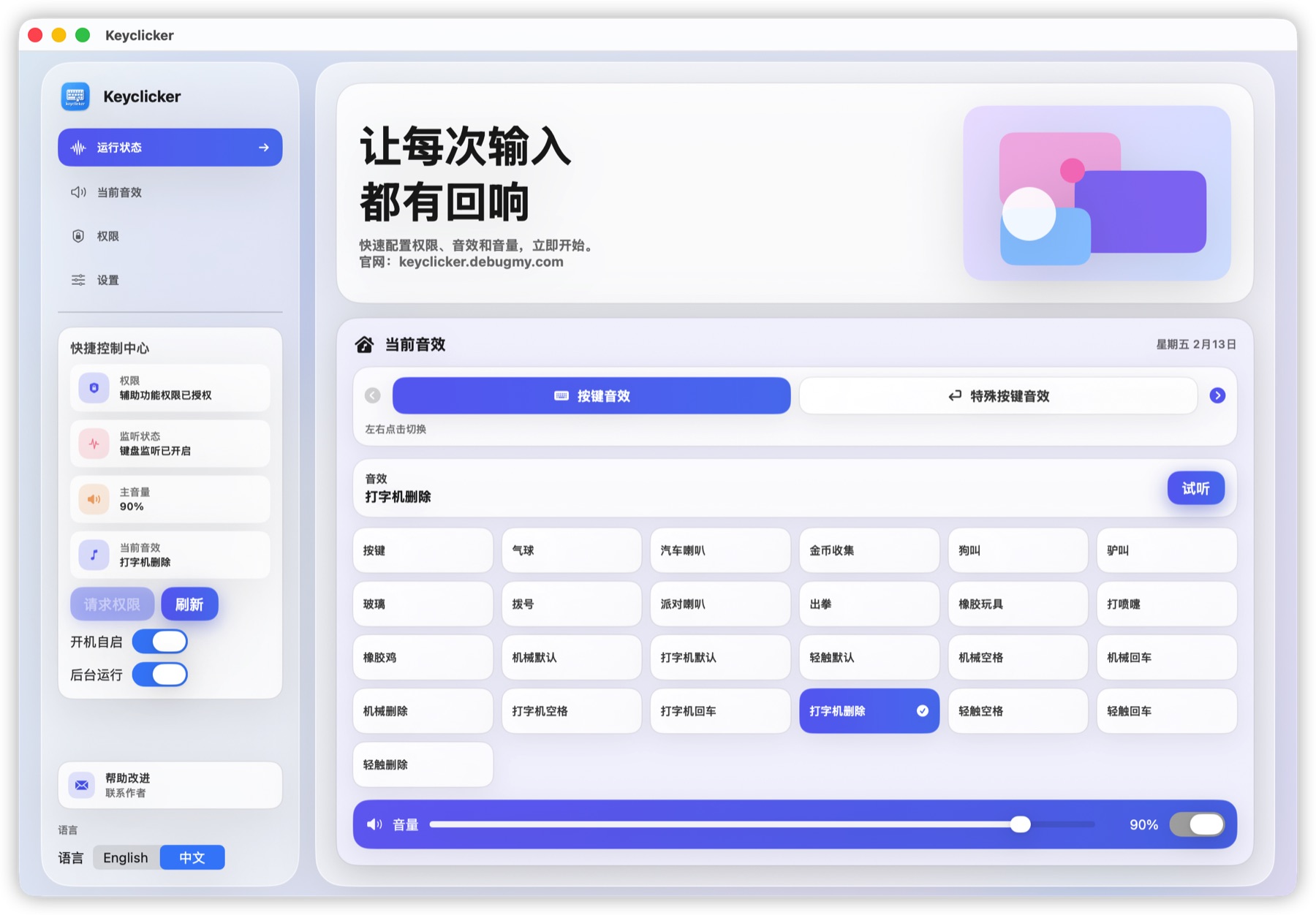
A modern keyboard sound tool built for macOS: a console-style interface focused on permission guidance, sound selection, and quick controls. It ships with 13 built-in system sounds plus 3 classic mechanical packs, runs in the background from your menu bar, and lets you configure sounds for global and special keys (Space / Return / Delete) independently. Quiet Hours can auto-silence sounds on a schedule, and the UI is fully bilingual in English and Chinese. Written in native Swift, lightweight and low-overhead, with native support for both Apple Silicon and Intel.

๐Ÿ–ผ๏ธ Interface Preview

Below is a screenshot of the current Keyclicker main interface.

Keyclicker main interface screenshot

๐Ÿงฉ Core Features

A modern glassmorphism interface with a low-distraction background experience - designed for everyday typing, coding, and creative work that benefits from audible keystroke feedback.

๐ŸŽง Rich built-in sound library

13 system sounds (Key, Coin, Balloon, Punch, and more) plus 3 classic mechanical packs: Mechanical, Typewriter, and Soft Touch. Tap any tile to preview instantly.

โŒจ๏ธ Independent special-key sounds

Space, Return, and Delete each get their own sound override - or follow the default. Special keys live in a collapsible accordion for a tidy layout.

๐ŸŒ™ Quiet Hours & background mode

Schedule auto-silence (default 22:00-08:00) so keystrokes stay quiet at night. Run in the background and close the window - the app keeps running from the menu bar.

๐ŸŒ Bilingual & menu-bar ready

Full English and Simplified Chinese UI that follows your system language. A menu-bar panel mirrors the essentials: toggle, volume, sound pack, preview, and quit.

๐Ÿ”’

Privacy First ยท Fully Local

Keyclicker is a fully local utility. It never collects, transmits, or shares any of your personal data. To play sounds, it only reads the hardware key code - an integer that identifies which key was pressed - and immediately discards it after playback. No characters, no words, no input text is ever read, logged, or stored. Everything runs on your Mac - no analytics, no telemetry, no network calls for tracking purposes. The Accessibility permission it requests is used solely for key detection and is processed entirely on-device.

  • 100% offline - no internet connection required to use the app.
  • No accounts, no sign-in, no data ever leaves your device.
  • No analytics, ads, or third-party trackers bundled in.
  • Only key codes (integers) are read - never characters or input content.